Lingue vs. Screenshot Wizard
Screenshot Wizard is a free browser tool by a solo developer that turns plain app screenshots into store-ready sets, with a promise you won't find in most tools: your images never leave your browser. Lingue is a paid product with a full pipeline behind the canvas. Comparing the two is really a comparison between a well-made free utility and a workflow you'd run a business on.
We make Lingue, and Screenshot Wizard publishes no docs or feature list, so everything below comes from its site as of August 2026. Where the site doesn't say, we say so.
Comparison at a glance
| Capability | Lingue | Screenshot Wizard |
|---|---|---|
| Price | From $15 a month, 7-day trial | Free, donation-supported |
| Account required | Yes | No |
| Where your images go | Your Lingue account in the cloud | Never leave your browser |
| Editor model | Freeform canvas, filmstrip | Canvas with slides and snapping |
| Exact store export sizes | Yes, App Store and Google Play | Claimed for both stores |
| Multi-language sets | Every store language, RTL automatic | Base-language workflow, manual copy |
| Publish direct to both stores | Yes, both plans | No |
| AI draft sets | Yes | No |
| Versioning | Yes (Pro) | No |
| Project storage | Cloud, across devices | Your browser only |
What Screenshot Wizard does well
- It's free, with no strings. No account, no sign-up, no watermarks, no ads, no analytics, no cookies. The developer takes donations. That's the entire business model, and it's refreshingly transparent about it.
- Privacy by architecture. The tool runs entirely client-side, and its privacy policy states that no external services are integrated at all. For an unannounced app under NDA, knowing your screenshots physically can't reach any server is a real feature no cloud tool can match, Lingue included.
- A real canvas, not a template picker. Slides, snapping, palettes, and per-element controls, with exact-pixel export claimed for both stores. For a free tool, that's an unusually capable editor.
- Multi-language support exists at all. A base-language workflow for localized sets is more than most free tools offer.
Where Lingue takes a different path
Screenshot Wizard is one person's free tool. Lingue is a product with infrastructure behind it. What that infrastructure buys you:
- Projects that survive. Screenshot Wizard stores projects in your browser, so a cleared cache or a different laptop means starting over. Lingue projects live in the cloud and follow your account.
- A first draft, written for you. Lingue's AI builds a full editable set with ASO headlines from your raw screens. In Screenshot Wizard you design and write everything yourself.
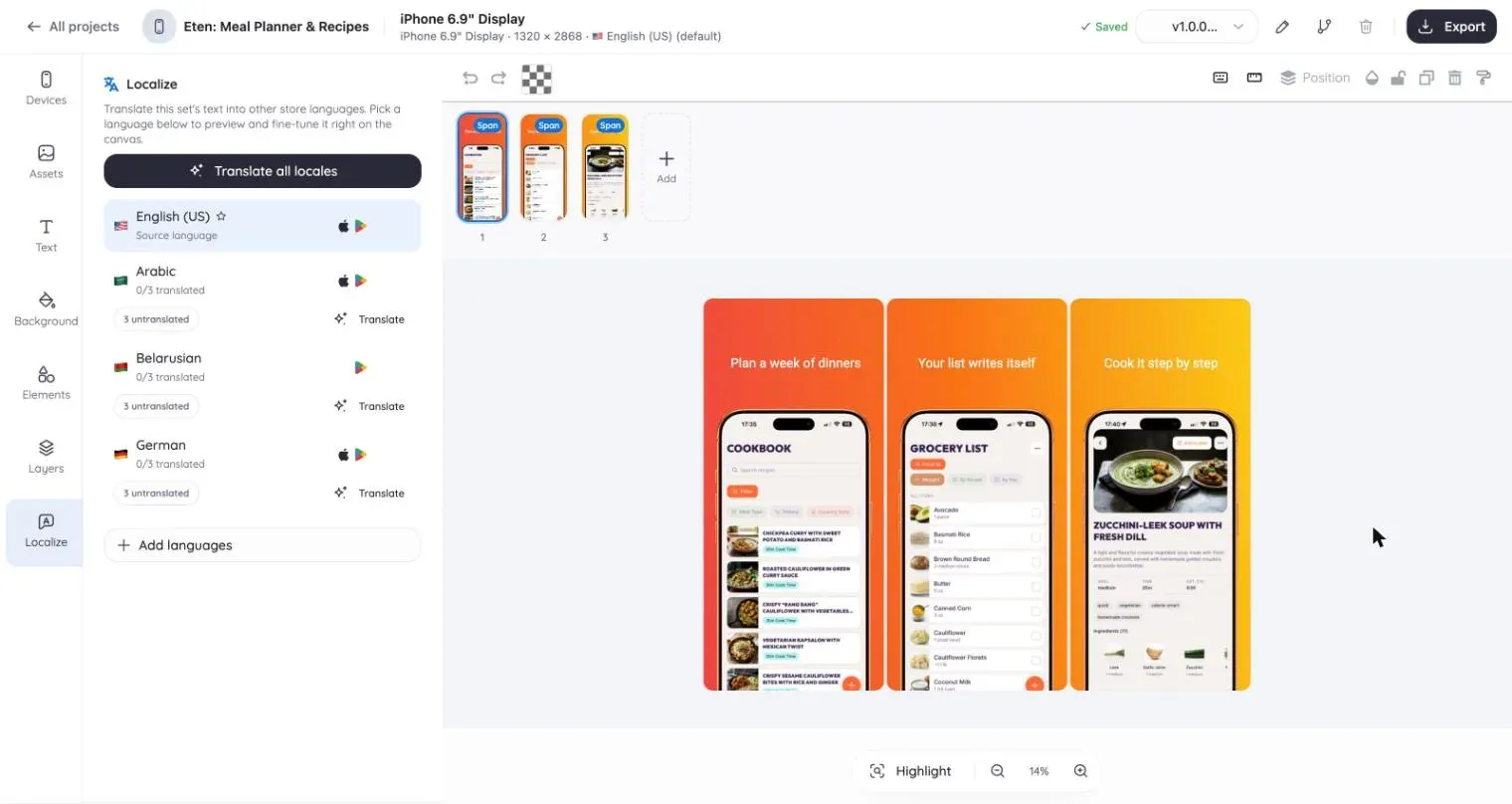
- Localization at scale. Lingue localizes one project into every App Store and Play Store language, mirrors right-to-left layouts automatically, and keeps the layout shared across locales. Screenshot Wizard gives you the language slots; the copy work is manual.
- Publishing. Store Sync imports your listing and uploads localized screenshots to App Store Connect and Google Play. With Screenshot Wizard you export and upload by hand, per store, per locale.
- Continuity. Lingue has a team, versioning on Pro, and support. Screenshot Wizard sits on a personal site next to a drum-tuning tool and a model railway project. It may run for years, but nothing guarantees it.
Pricing, as of August 2026
Screenshot Wizard is free, with an optional donation link.
Lingue is $15 a month or $99 a year on Starter, $35 a month or $180 a year on Pro, with a 7-day free trial.
There's no way to spin that: on price, the free tool wins. The question is only whether the manual work it leaves you with costs more than $15 a month of your time.
Which one should you pick?
Choose Screenshot Wizard if your budget is zero, your app is one product in one or two languages, or privacy is the deciding factor and you want screenshots that never touch a server.
Choose Lingue when the manual parts start to hurt: many locales, repeated updates, multiple device sizes, store uploads eating an afternoon, or a redesign you wish you could roll back. That's the work the editor, localization, and Store Sync automate.
For paid alternatives, see Lingue vs. AppScreens and Lingue vs. Appshots, another free tool worth knowing.
Common questions
Is Screenshot Wizard safe for unreleased apps?
Its architecture is the strongest privacy stance in this category: fully client-side, with a privacy policy stating that images and projects never leave your device. If your screenshots must not reach any third-party server, it beats every cloud tool, including Lingue.
What do I give up by using a free tool here?
Cloud storage of projects, AI-drafted sets, automatic translation workflows and RTL mirroring, direct publishing to both stores, versioning, and someone to email when something breaks. Whether that's worth $15 a month depends entirely on how often you ship.
Can Screenshot Wizard upload to App Store Connect or Google Play?
No. It has no accounts and no server side, so store integration isn't possible by design. You export the images and upload them in each console yourself.