Lingue vs. AppLaunchpad
AppLaunchpad has been around since 2016 and its pitch is volume: over 1,000 templates, thousands of icons and backgrounds, and a quick path from template to store-ready screenshots. Lingue is a design canvas with AI drafts, localization, versioning, and direct store publishing. The template-versus-canvas divide runs through this whole comparison, so let's be concrete about what each side gets you.
Full disclosure: we make Lingue. AppLaunchpad details come from its site and help center as of August 2026.
Comparison at a glance
| Capability | Lingue | AppLaunchpad |
|---|---|---|
| Editor model | Freeform canvas | 1,000+ templates |
| Stock assets | Shapes, badges, emoji | 5,000+ graphics (Pro) |
| Exact store export sizes | Yes, PNG and JPEG | Yes, PNG and JPEG (paid) |
| Localization | Every store language, both plans | AI translation (Pro) |
| Right-to-left layouts | Automatic | Not documented |
| Publish direct to both stores | Yes, both plans | No |
| AI draft sets from raw screens | Yes | No |
| Versioning | Yes (Pro) | No |
| Free option | 7-day trial | Free plan with limited exports |
What AppLaunchpad does well
- The biggest template library in the category. 1,000+ pre-built templates is more than any competitor we've looked at, and even rivals concede the collection is the largest in the space. If your ideal workflow is "find a design that's 90% there and swap in my screens", this is the strongest starting library.
- Stock assets in volume. Thousands of icons, backgrounds, and graphics live inside the editor, so you rarely need to hunt for an asset elsewhere.
- One-click translation. Select a language and AppLaunchpad's AI translator applies it across all screenshots at once. It's a Pro feature, but a well-executed one.
- Low barrier to entry. Browser-based, template-first, and aimed squarely at non-designers.
Where Lingue takes a different path
Templates get you to a decent set fast, and then they stop. The moment you want a layout that isn't in the library, an element the template didn't plan for, or a design that doesn't look like other apps in your category, you're working against the tool.
Lingue starts from the opposite end. The canvas is yours: filmstrip editing across the whole set, panoramic backgrounds, device frames with 3D tilt, any Google Font or your own uploads. Instead of 1,000 fixed layouts, the AI drafts a layout from your actual screens and your app's description, with ASO headlines written in, and everything it makes stays editable.
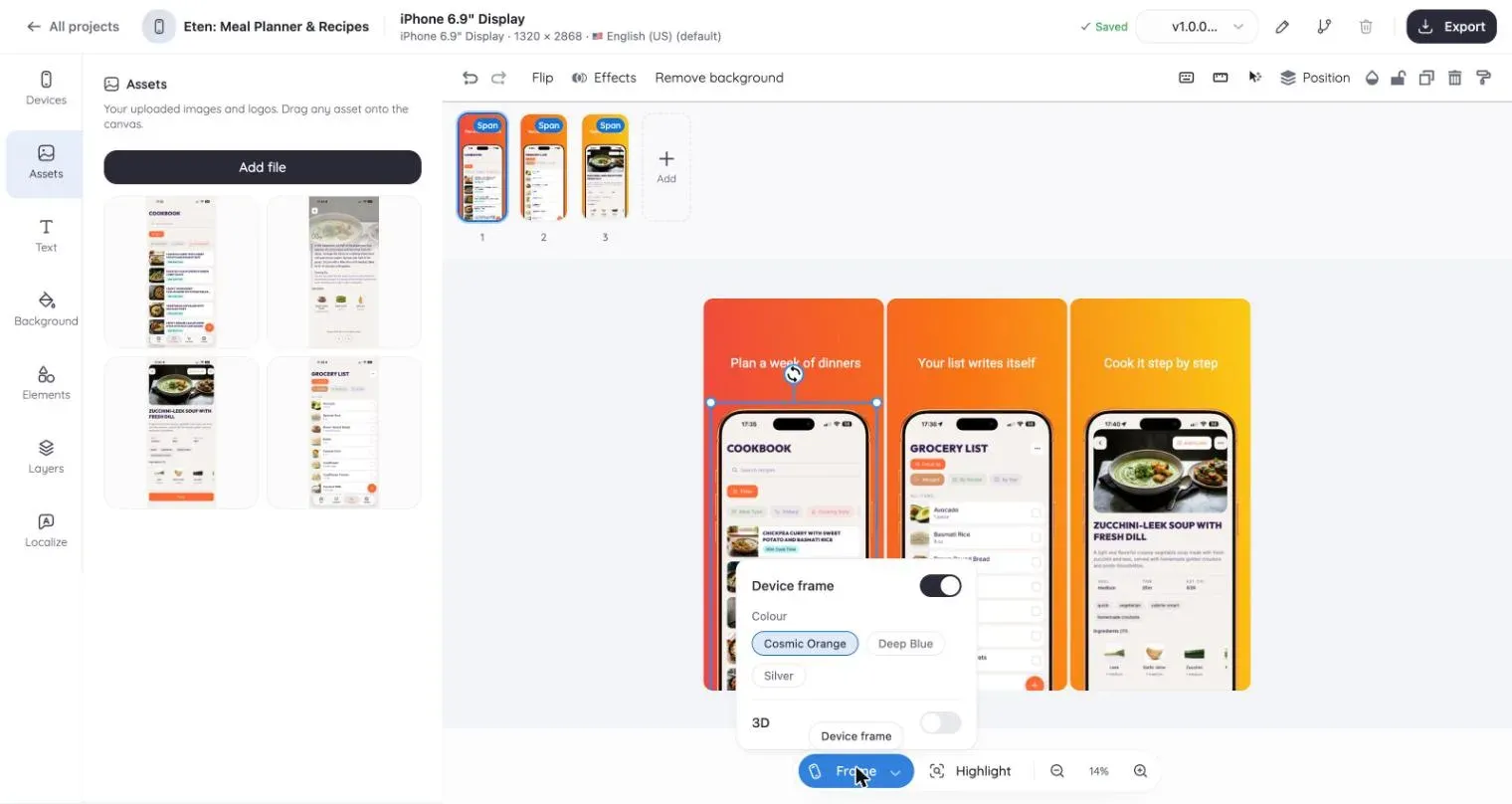
The pipeline differences matter just as much:
- Publishing. Store Sync connects App Store Connect and Google Play, imports your existing listing, and publishes per locale and device. AppLaunchpad has no store integration; you download a ZIP and upload by hand.
- Localization depth. AppLaunchpad translates text in one click, which is handy. Lingue keeps every locale in one project on a shared layout, mirrors right-to-left languages automatically, and publishes each locale to the stores. AppLaunchpad doesn't document RTL handling or a language count.
- Versioning. Lingue Pro snapshots sets, branches redesigns, and restores old versions. AppLaunchpad saves projects to the cloud but has no version history.
- The free plan actually exports. Lingue skips the free tier and gives you a 7-day trial of the real product. AppLaunchpad's free plan is easy to start but limits exports, and a recurring complaint in public reviews is hitting premium-element paywalls at download time.
Pricing, as of August 2026
AppLaunchpad: a free plan to get started, and one Pro plan at $29 a month, or $15 a month billed annually. The free plan is a sampler: 10 of the 1,000+ templates, 100+ graphics, and a cap on how much you can export. Pro removes the export cap and opens up the rest: the latest device frames, AI translation, and the full template and asset library.
Lingue: Starter at $15 a month or $99 a year, Pro at $35 a month or $180 a year, with a 7-day free trial and every feature visible before you pay.
Worth noting on the price match: Lingue Starter is $15 on monthly billing, while AppLaunchpad reaches $15 only when you commit to a year.
Which one should you pick?
Choose AppLaunchpad if template volume is the point for you: you want to browse a thousand layouts, pick one, swap in screens and text, and ship without thinking about design.
Choose Lingue if you want a set that doesn't look like a template, a first draft written by AI from your real screens, localization with RTL support, version history, and publishing to both stores from the same project. The editor tour shows the canvas in action.
For the wider landscape, see Lingue vs. AppScreens and Lingue vs. Previewed, or browse all guides and comparisons.
Common questions
Can AppLaunchpad publish to App Store Connect or Google Play?
No. You export files and upload them in each store console yourself. Lingue's Store Sync publishes localized sets to both stores directly, on both plans.
Which tool is better for non-designers?
Both, in different ways. AppLaunchpad hands you finished templates to fill in. Lingue has its AI build the starting design from your screens and app description, so you edit a draft instead of choosing from a library. If you never want to touch a canvas, AppLaunchpad's approach is simpler; if you want the result to be yours, Lingue's is.
Do both tools export exact store sizes?
Yes, both export the resolutions Apple and Google require, in PNG or JPEG. The sizes themselves are in our App Store and Play Store guides. On AppLaunchpad, exporting is a paid feature in practice.